 Need for travel
Originally published on 29 October 2026. This is how the system worked then; see How it works for today.
Updates
- 29 Oct 2026 – Rewritten from scratch: two car computers with OBD-II, screens and hardware set up in Basecamp, live car readings on the map and in trip posts, “Where I parked”, health checks with phone alerts, and stricter privacy around home.
- 26 Oct 2026 – A new theme with posts written automatically from Dawarich trips and Immich photos, a live map, a redesigned Basecamp with the Garage, a statistics page and the first dashboard computer in the Sienna.
A few weeks ago the plan was modest: tidy up the site a little. What followed was a complete rebuild of the website, of everything that feeds it, and in the end even of our cars’ dashboards. The result is a site that, as the footer says, writes itself from the road. This post explains how the whole thing works today, from a small screen next to the steering wheel to the page you are reading.
The whole system in one picture
There are three places where things happen. In the car, small computers show us what the engine is doing and report where we are. At home, one server does the thinking: Node-RED connects our location history (Dawarich), our photos (Immich), offline place names (Photon) and the home charger (EVCC), builds firmware for the cars and writes the posts. On the web, WordPress shows the result, and Basecamp, our private control panel, lets us steer all of it from a phone.
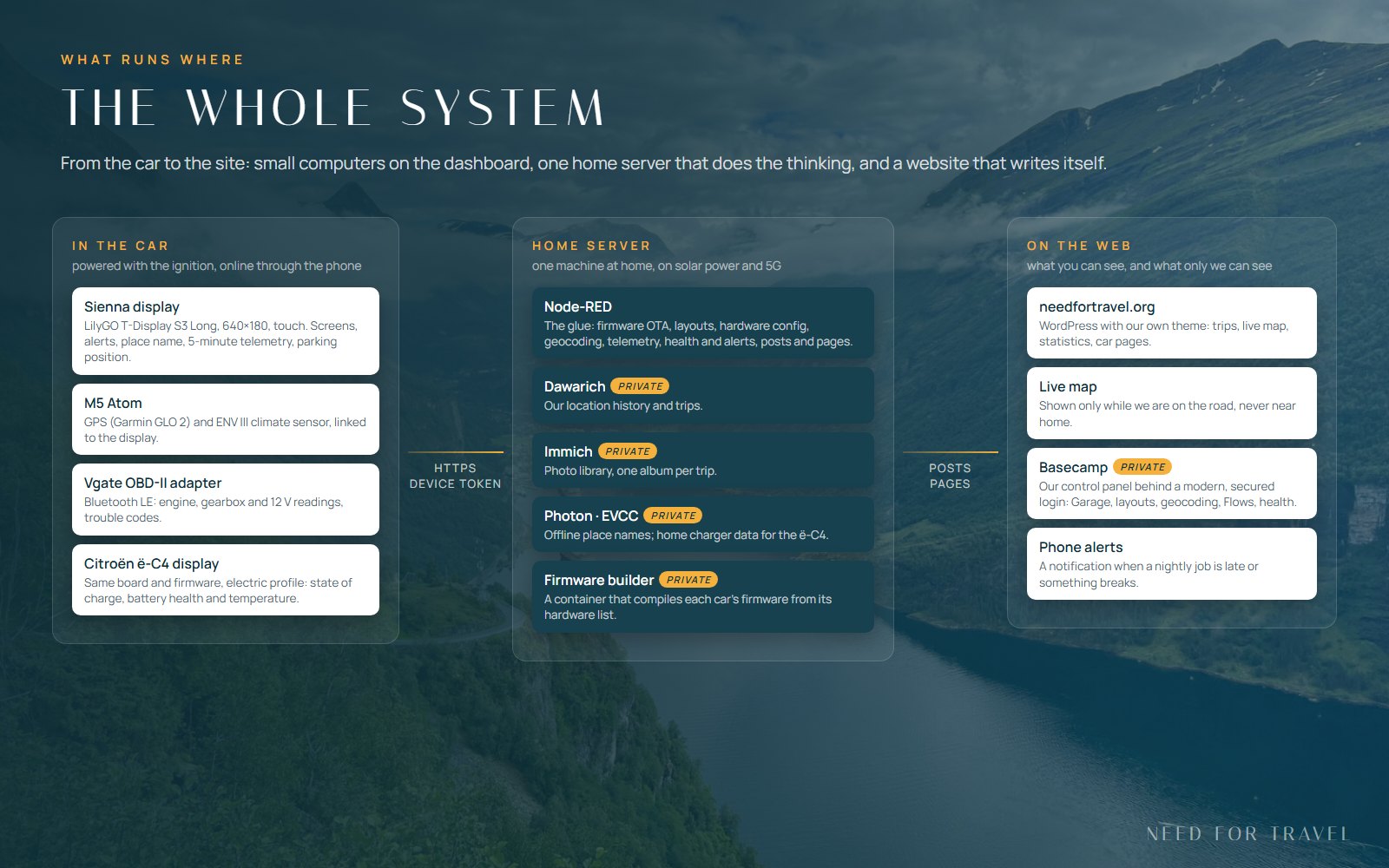
Nothing on the site is typed in by hand. Everything comes from data we already collect while travelling. The cars and the website talk to a few public endpoints that each check a token, and everything else is reachable only by us.
From the very beginning the main idea was to depend on outside services and providers as little as possible. That is why everything that can run at home does run at home: the location history, the photo library, the place names, the charger, the automation and the firmware builds. The server runs on power from our solar panels and a home battery, so for most of the year we could keep it going completely off-grid. And the whole system, this website included, is hosted at home over… a 5G connection.
One trip, one JSON, one post
Everything still starts in Dawarich, where our GPS tracks live. A trip there is a date range, a route and a short block of JSON in its description: type, vehicle, accommodation, an excerpt and the text of the post. Photos stay in Immich, and tagging a photo is all it takes to say “this one belongs on the site”. Every few minutes Node-RED checks which trips are ready, builds the post with its map, stats and gallery, and publishes it as a draft or live, depending on what the trip itself says.
The theme is our own small block theme: one typeface family, a palette taken from fjords and glaciers, maps with every day of a trip in its own colour and the weather of each day, and journals that link their stages with “previous” and “next”. It updates itself from Node-RED like an app, and every release is simply called “Build N”.
Computers on the dashboard
Our cars are getting small computers of their own: a LilyGO T-Display S3 Long, a long and narrow ESP32-S3 touch screen of 640 by 180 pixels on the dashboard. The Sienna has been driving with one for a few days, the one for the Citroën is waiting for its hardware. Both run the same firmware; what differs is the hardware each car carries.
- The Sienna reads the engine through a Vgate OBD-II adapter over Bluetooth Low Energy: coolant, engine speed, load, throttle, intake air, voltages, and the fault codes, which it can also read and clear. Next to it an M5 Atom carries an ENV III sensor (cabin temperature, humidity, pressure) and the Garmin GLO 2 GPS receiver, and passes everything to the display.
- The Citroën ë-C4 will have only the OBD-II adapter, but it asks the electric car’s own battery computer for what matters there: state of charge, battery health and battery temperature, plus the 12 V battery and the outside temperature.
The screens are swiped like a phone: graphs of two chosen values, the main screen, all OBD-II data, the GPS and climate unit, and a diagnostics panel. The status bar shows the time, the GPS, Bluetooth and WiFi icons and the name of the place we are driving through. The clock even moves to the local time zone by itself, summer time included, because the server looks the zone up from the position.
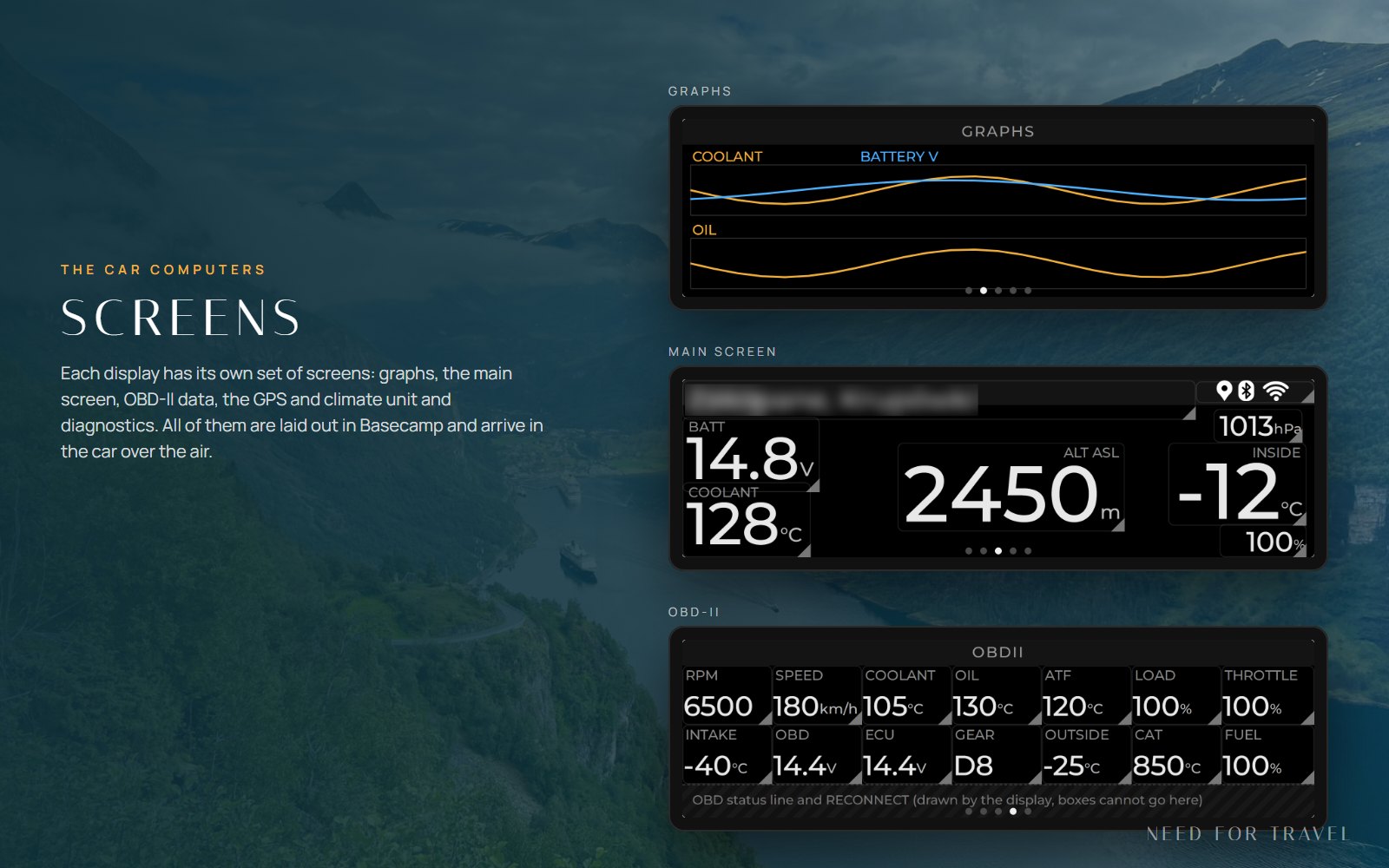
The cars go online through the phone’s hotspot, so mobile data matters when we drive abroad. Everything the display sends or asks for adds up to roughly one megabyte per hundred kilometres, and nothing at all while the car is parked, because the computer switches off with the ignition.
New firmware arrives over the air. A build server at home compiles each car’s firmware from its own hardware list, Node-RED publishes it as the next build, and the display asks the driver before it installs anything. If a new build does not start properly, the board goes back to the previous one by itself, and the server notices that too.
Basecamp: steering it all from a phone
Basecamp started as a quick photo tagger and grew into the control room of the whole project. Access to it is protected with a modern login, and since this week Node-RED also checks the signed login token on every request instead of trusting that the login happened. The menu is short: Garage, Trips & photos, Flows, Statistics and Geocoding, with a “+” for a new fill-up and a GPS pin that starts live tracking.
The Garage has a page for every car: overview and reminders, costs, the fuel log (or, for the ë-C4, charging sessions straight from EVCC), the devices installed in it with the build they run and their last check-in, dates for inspection and insurance, and the public page of the car on this site.
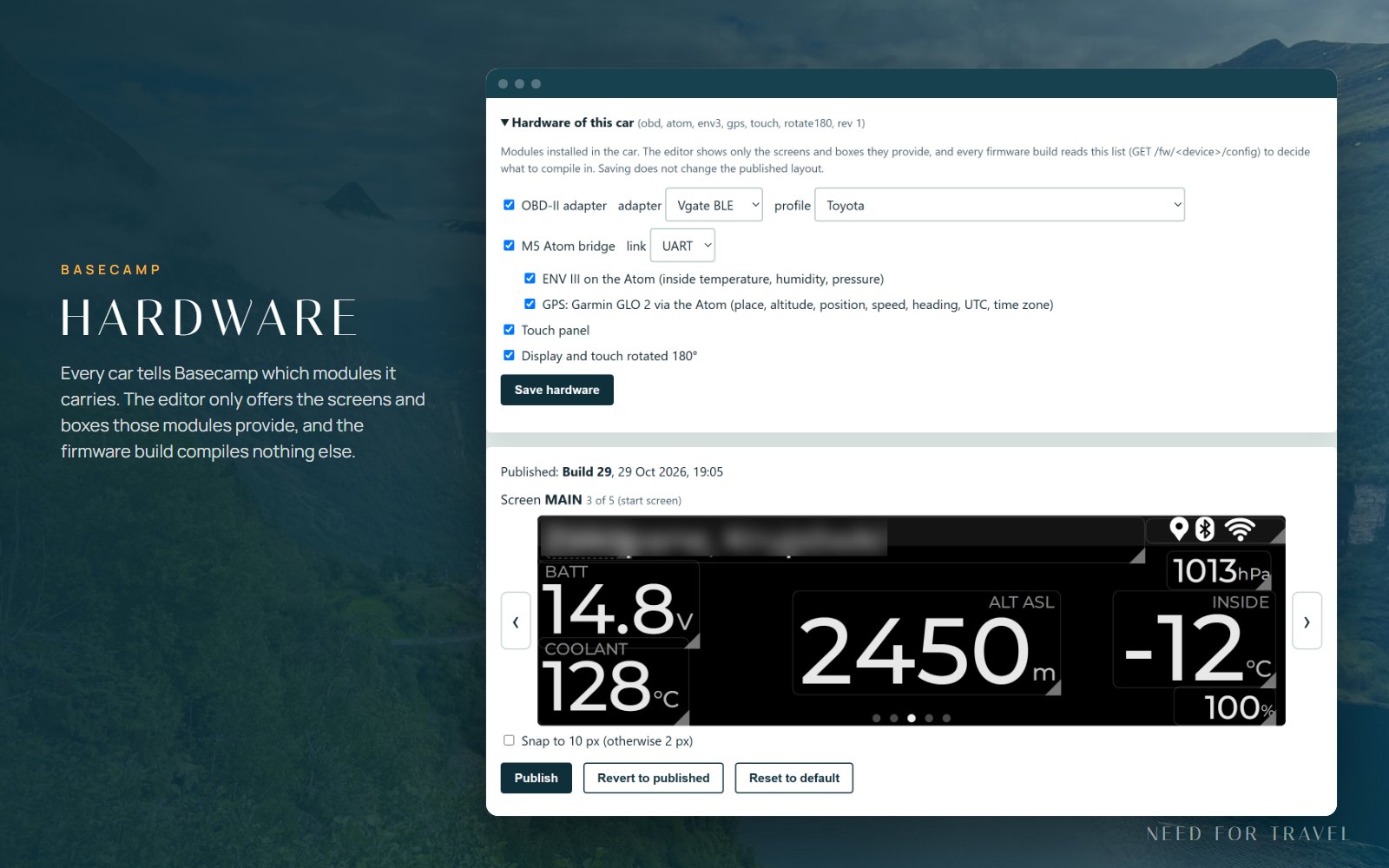
Display layout is where the screens are designed. Every box can be moved and resized with a finger, and the preview uses the real fonts of the display, so a box that would not fit is marked in red before it ever reaches the car. One Publish sends all screens; the display picks the new layout up within a quarter of an hour. Above the editor sits the hardware list of the car: tick the OBD adapter, the Atom, the GPS or the climate sensor, and the editor offers only the screens and values that hardware can deliver. The firmware build reads the same list and leaves out everything that is not there.
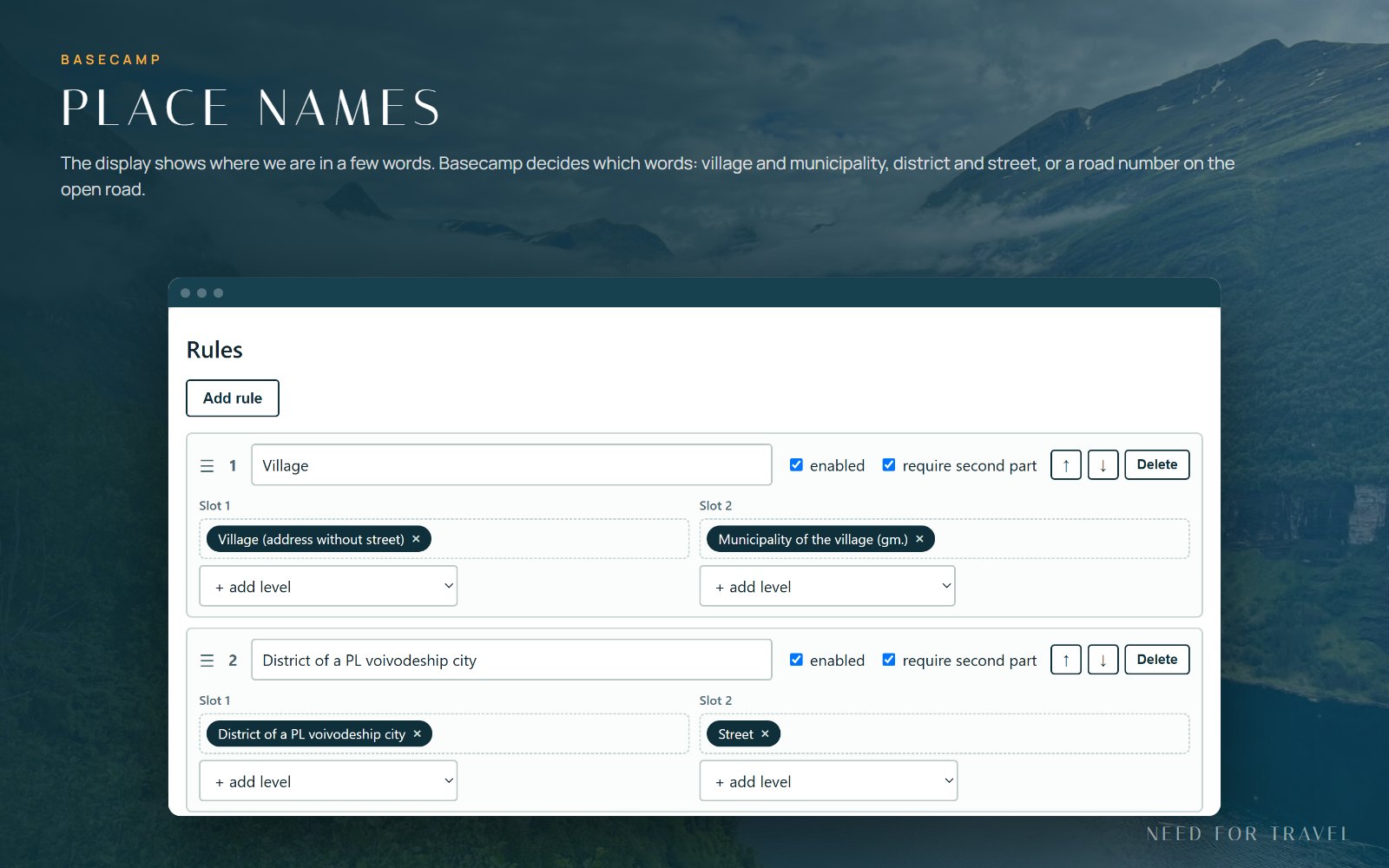
Geocoding decides what the place name on the display says. Instead of a long address, a few rules pick the right words: village and municipality, a district and a street in a city, or a road number in the open countryside. The names come from our own Photon server, so looking them up costs nothing and tells nobody where we are.
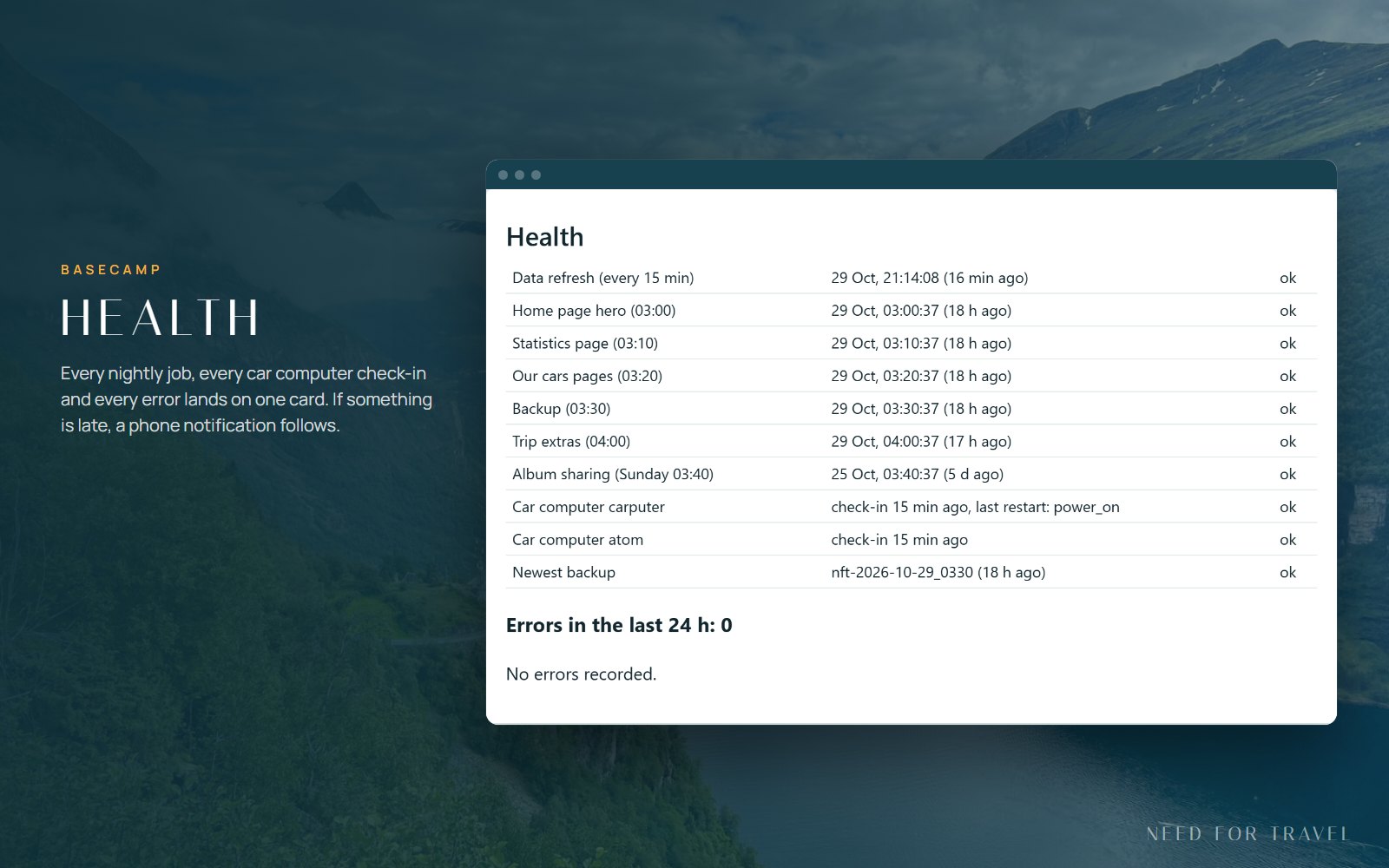
Flows has a button for every job the automation can do, and at the top a Health card: when each nightly job last ran, when each car computer last checked in and whether it restarted unexpectedly, the newest backup, and every error of the last day. A small watchdog looks at the same numbers every fifteen minutes and sends a notification to the phone when something is late or broken.
Live tracking, now with the car
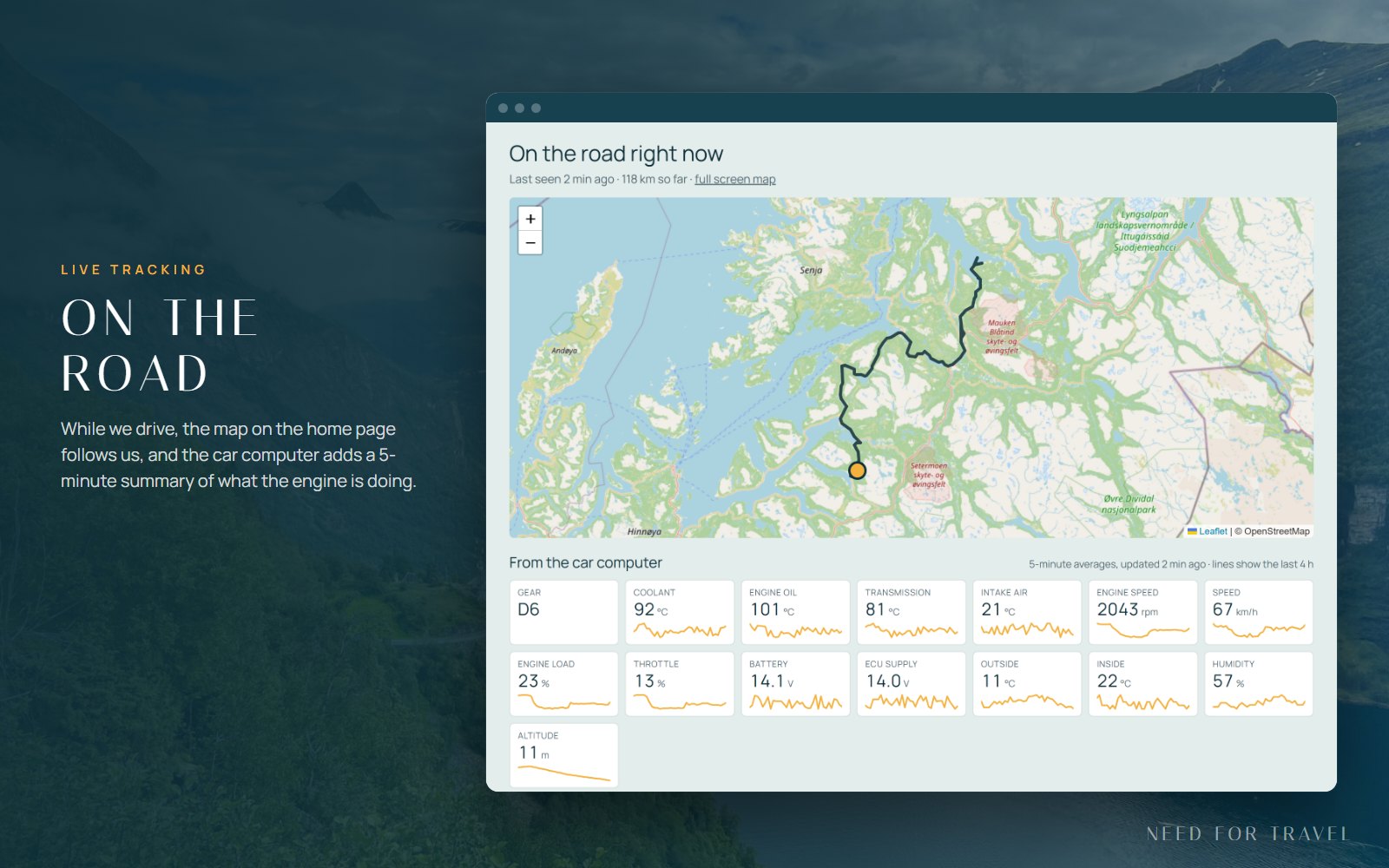
When we set off, one tap on the pin in Basecamp starts live tracking, and the home page of this site shows a map that follows us. The car computer now joins in: every five minutes it sends a short summary of what it measured, and under the map a panel shows the newest values with a small line of the last hours for each. Only averages are sent, nothing that identifies the car, and the panel disappears together with the map when tracking stops.
Trip posts that remember the drive
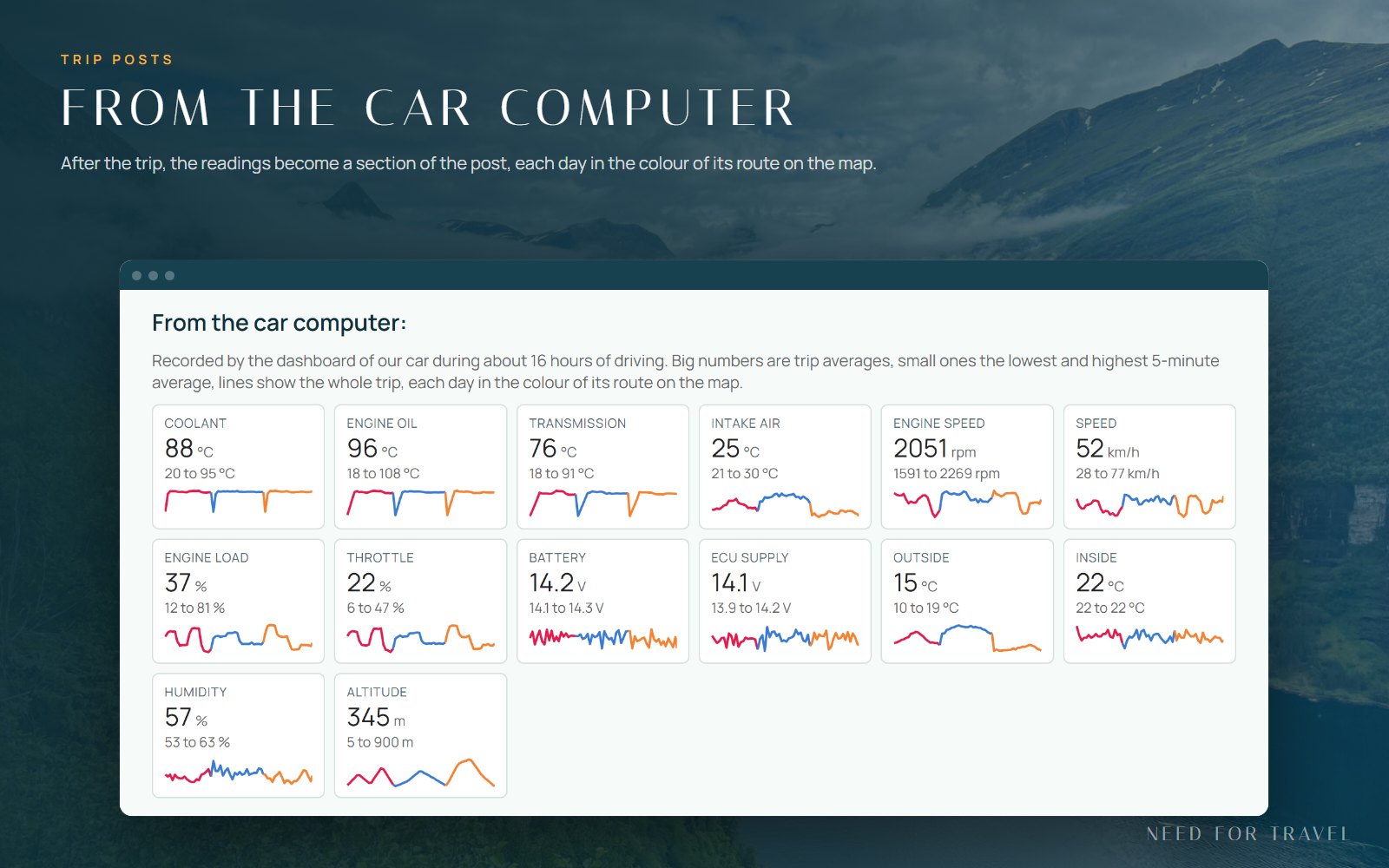
When tracking stops, the readings of the whole trip are kept, and the next time the trip post is built it gets a new section, “From the car computer”: the average, the lowest and the highest value of everything the car measured, with a line for the whole trip in which every day has the colour of its route on the map. Long trips that last weeks keep all their readings, so even a month in the north will get its section.
Where I parked
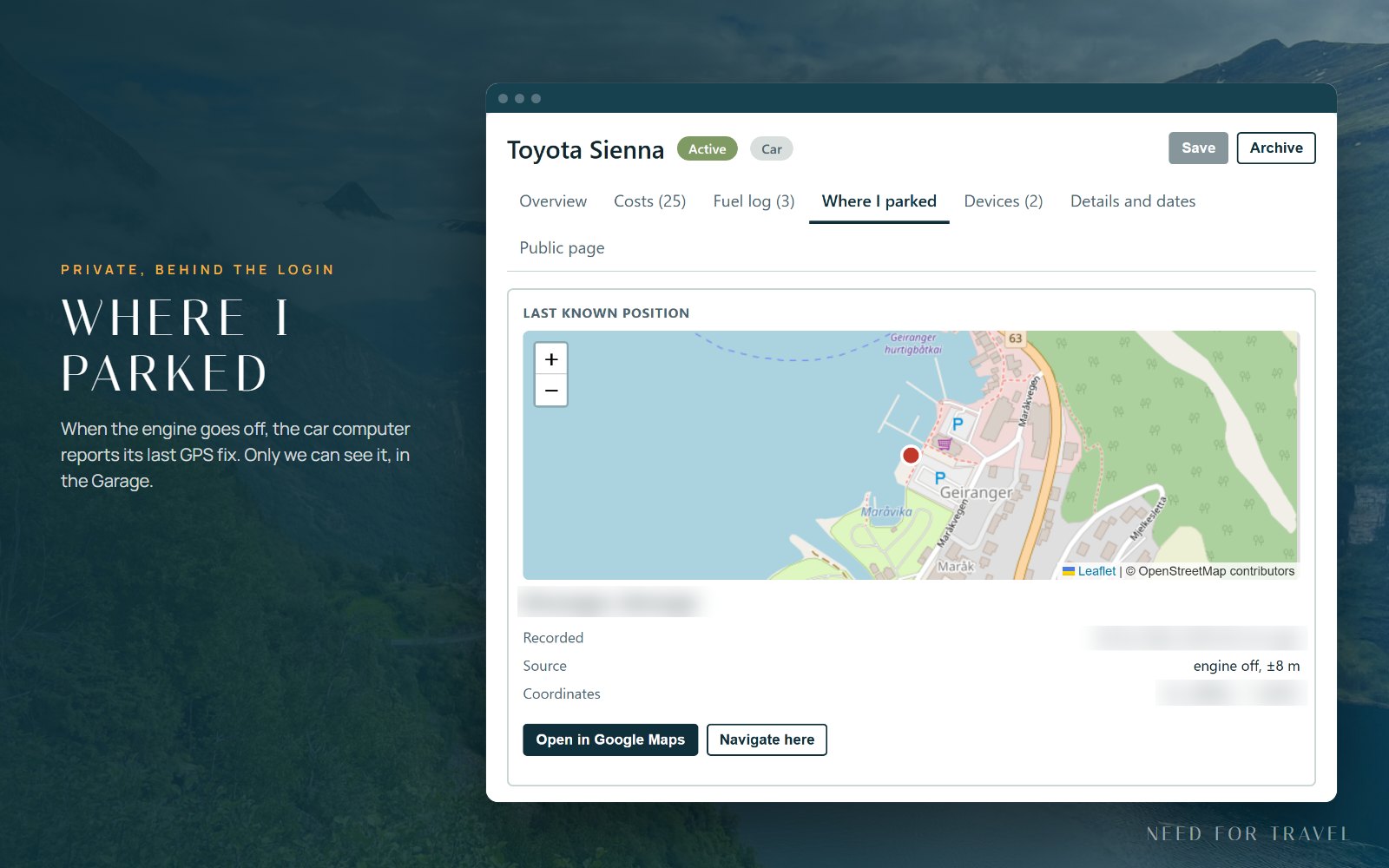
A small feature we use more than we expected. When the Sienna is put into Park, the car computer saves its last GPS position and sends it home, and if there is no signal it sends it at the next start. In Basecamp, the Garage shows a map with the spot, the time and links to navigate there. It is private: the parking position is never shown on the public site or the live map.
Home stays private
A site that publishes where we are has to be careful about where we live. The rules are simple and they are enforced on the server, not in the browser:
- The position of home never leaves the server. Routes are cut where they enter a circle around home before anything is published, and the live map draws no circle that could give the centre away.
- The live map hides itself as soon as we are back near home, and shows only a short note that we are home.
- Short local trips get a pin and a wide circle instead of an exact route.
- The parking position and anything else personal exist only in Basecamp, behind the login.
- The screenshots in this post use sample data, and everything that could point to a place or a private service is blurred.
Statistics and the electric car
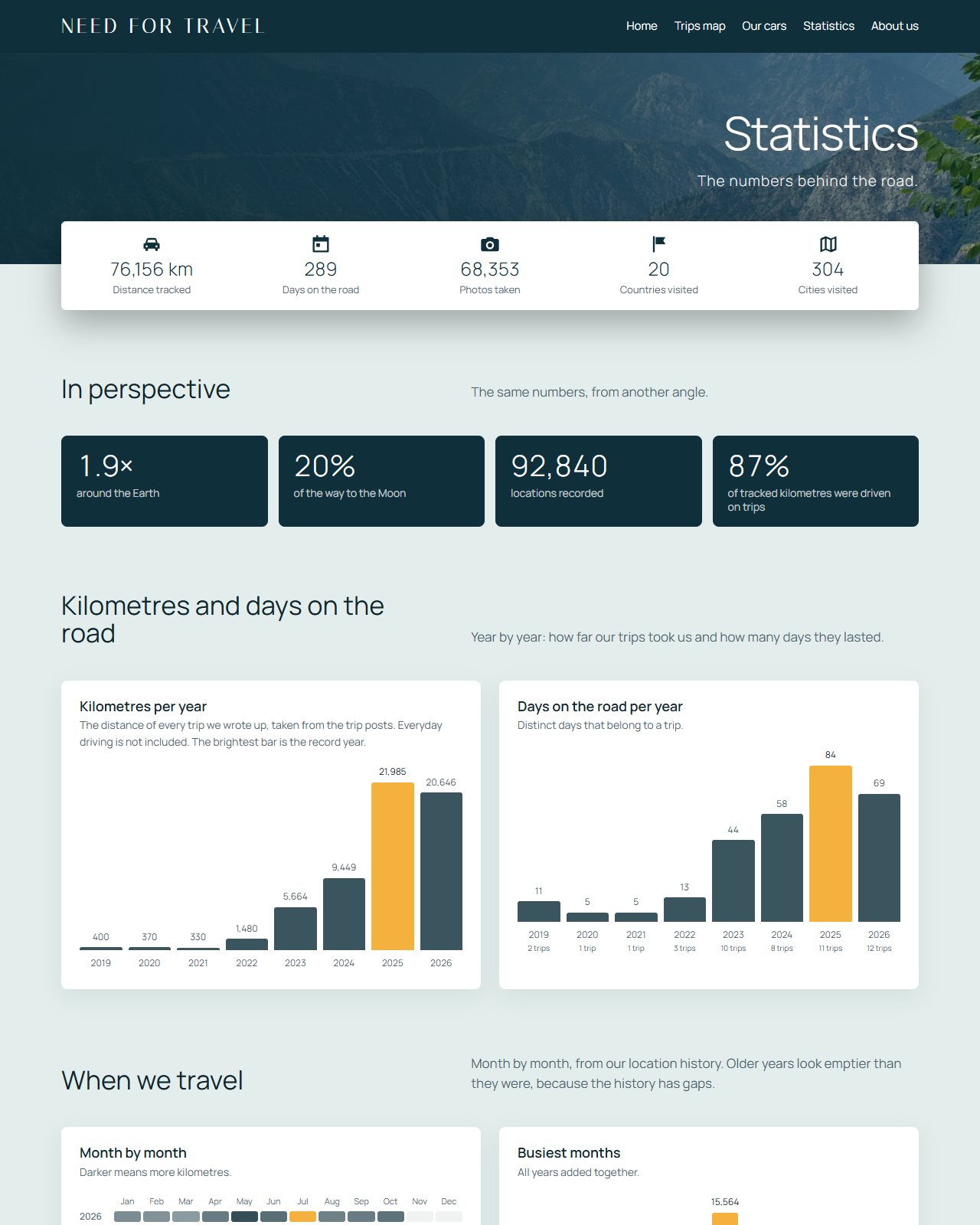
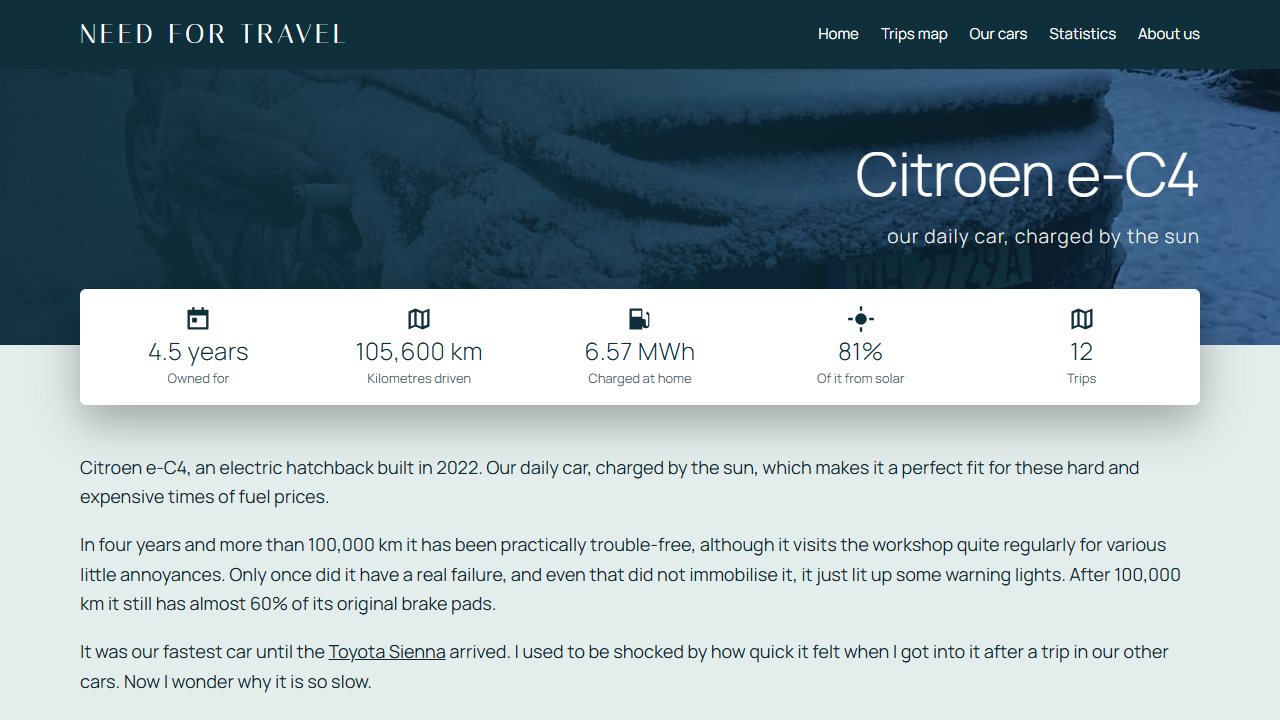
The Statistics page counts everything automatically: trips, days on the road and kilometres per car, and at the bottom a “How this site is built” section that counts its own flows and lines of code. It rebuilds itself every night. The page of the Citroën ë-C4 does the same for the electric car, with the energy charged at home and the share of it that came from the sun.
Small things that make it robust
- Older posts are protected. The automation never rewrites posts that were finished by hand, and a weekly snapshot keeps a copy of them anyway.
- Nightly backups keep the last fourteen copies of everything, and data files are written in a way that a crash can never leave half a file behind.
- Every error is caught, logged and shown on the Health card instead of disappearing silently.
- Firmware updates roll back by themselves when a new build does not start properly, and each car only accepts updates made for it.
Built together with Claude
Most of this was written in conversation with Claude, one request at a time: “can the map show every day in its own colour?”, “why did that photo disappear?”, “where did I park?”. It is a strange and pleasant way to build things, somewhere between pair programming and giving instructions to a very patient colleague. The nice part is that the result is ordinary, readable code that I can still open, understand and change myself.
This week went further than ever. Several conversations ran side by side, one on the firmware, one on Basecamp, one on the site, one on the case for the display, and they agreed on short written contracts for how the car and the server talk to each other. When the firmware wanted a new screen, the editor in Basecamp was ready for it the same evening.
What is next
Oil and transmission temperatures from the Sienna’s own computers, a data saver for roaming, a 3D-printed case for the display, the ë-C4 display on the road, and, finally, more trips. That last one needs no code at all: the cars are ready, so now we just have to go somewhere.